Local Agentic AI · ReAct · Built in Go

Your Library Knowledge Base
— plus the web and conversations.

A local-first conversational ReAct assistant in Go. Flip two toggles to choose where answers come from: 📚 My Library (your own PDF books, searched natively over Pinecone) and 🌐 Web (live results via Tavily). It remembers your conversations, narrows to a single book when you name one, cites its web sources, and labels every answer with where it actually came from.

Conversation memory (MongoDB) Native Pinecone PDF search Honest source labels Local Ollama · optional Claude
Dharmendra Yadav
Sr. Lead Engineer / Engineering Manager · Agentic AI Architect · Team Leadership & Delivery · AI-Augmented Product Engineering
2
Source toggles · Web + Library
Go
Single-language stack
Local-first
Ollama default · Claude optional
No 3rd-party
Native Pinecone PDF search
What it is

You choose where the answer comes from

Two toggles sit next to the chat box. They decide which retrieval tools the agent is even allowed to use this turn — so the answer is always grounded in a source you picked, never a silent guess.

My Library

📚 My Library

Answers come from your PDF books — embedded with Ollama and searched directly over Pinecone — plus the MongoDB database via MCP. Name a book and it narrows the search to just that title.

Web

🌐 Web

Answers use live web search via the Tavily API. The source URLs are captured and rendered as clickable, persisted "Sources" chips on the answer.

Web Library

Both off

No retrieval tools are wired in — the agent answers from the model's own knowledge. If it doesn't know, it says so and suggests enabling 🌐 Web instead of hallucinating.

What's inside

Built for grounded, honest answers

Every capability exists to keep the assistant accurate and transparent — grounding answers in sources you control, and telling you exactly where each answer came from.

Conversation memory

Turns are persisted in MongoDB via a direct Go driver. A token-budgeted tier keeps recent turns verbatim and folds older ones into a rolling summary, so prompts stay cheap on small local models.

Native PDF search

No external service. The agent embeds your query with Ollama (nomic-embed-text) and queries Pinecone directly for the most relevant book chunks — ported from the Omni-RAG retrieval code.

Book-title narrowing

Mention a book in chat and it resolves against a Mongo books catalog, filtering the vector search to just that title. Ambiguous? The agent clarifies — "do you mean X or Y?" — instead of guessing.

Web citations

Tavily source URLs are captured during the ReAct loop and rendered as clickable, persisted "Sources" chips — so every web-backed claim links back to where it came from.

Honest provenance labels

Each answer carries a tag for exactly where it came from: from My Library, from Web, from Database, or the model's own knowledge. No source pretends to be another.

Drag-and-drop ingestion

A dedicated ingest page takes a PDF, then extracts → chunks → embeds → upserts it into Pinecone and a Mongo books catalog — adding it to My Library for the agent to cite.

Read-only recall tool

A dedicated recall_history tool, scoped to the current conversation and injected by the backend, lets the model fetch exact earlier messages — never the destructive MongoDB CRUD tools.

Dual LLM backend

Runs fully local on Ollama by default; switches to Anthropic Claude when ANTHROPIC_API_KEY, ANTHROPIC_MODEL, and ANTHROPIC_CREDIT_BALANCE: true are all set — no code change.

MongoDB over MCP

A standalone MongoDB Model Context Protocol server exposes CRUD as discoverable tools over SSE. Gated behind My Library, and kept separate from the deterministic conversation-history layer.

Walkthrough

The agent in action

A step-by-step tour of the live UI — from an empty chat to library-grounded answers, web citations, ingestion, and conversation history. Click any screenshot to zoom.

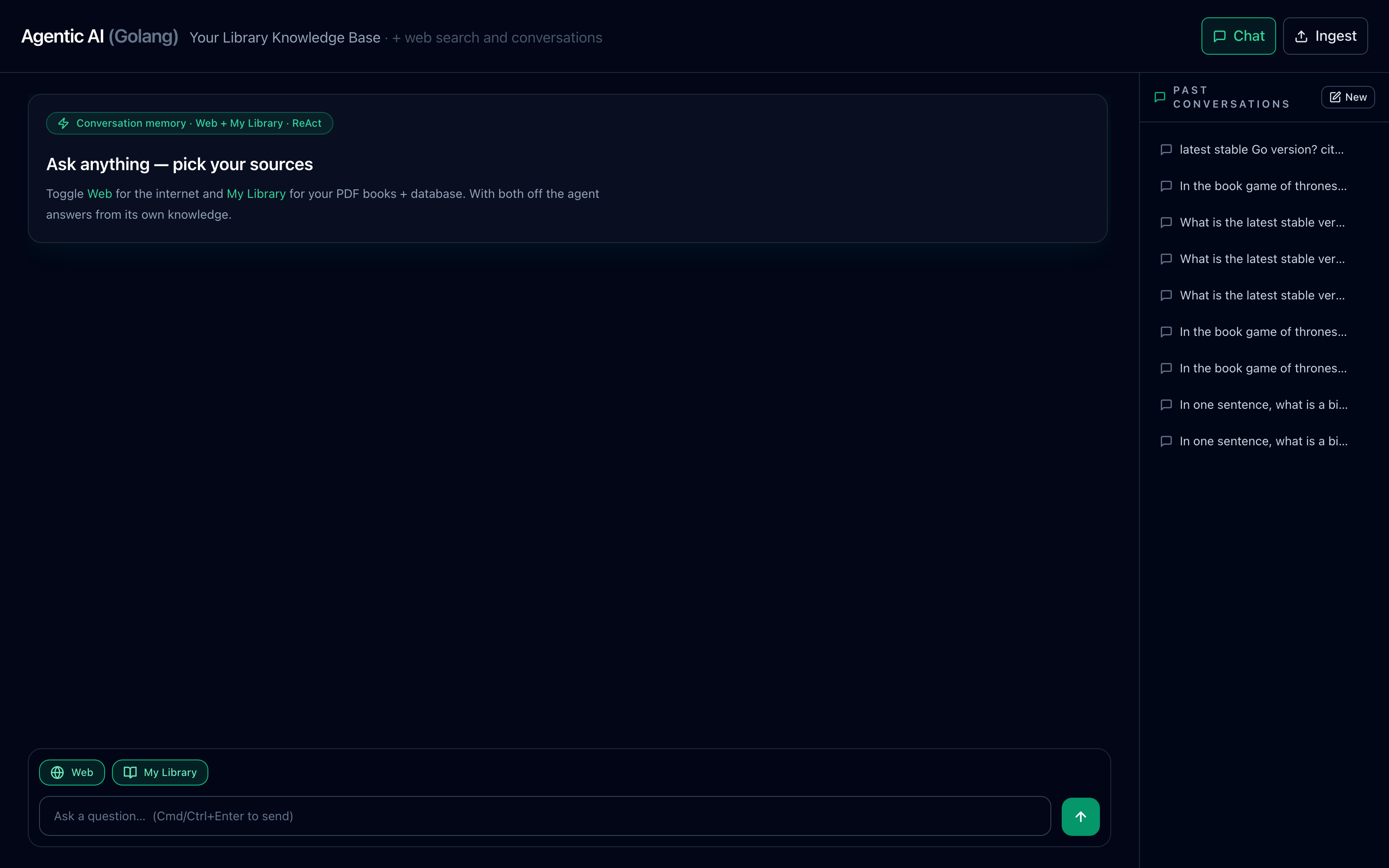
1

Start a conversation, pick your sources

The hero greets you with the two source toggles off by default. Flip 📚 My Library and/or 🌐 Web to decide where this turn's answer may come from.
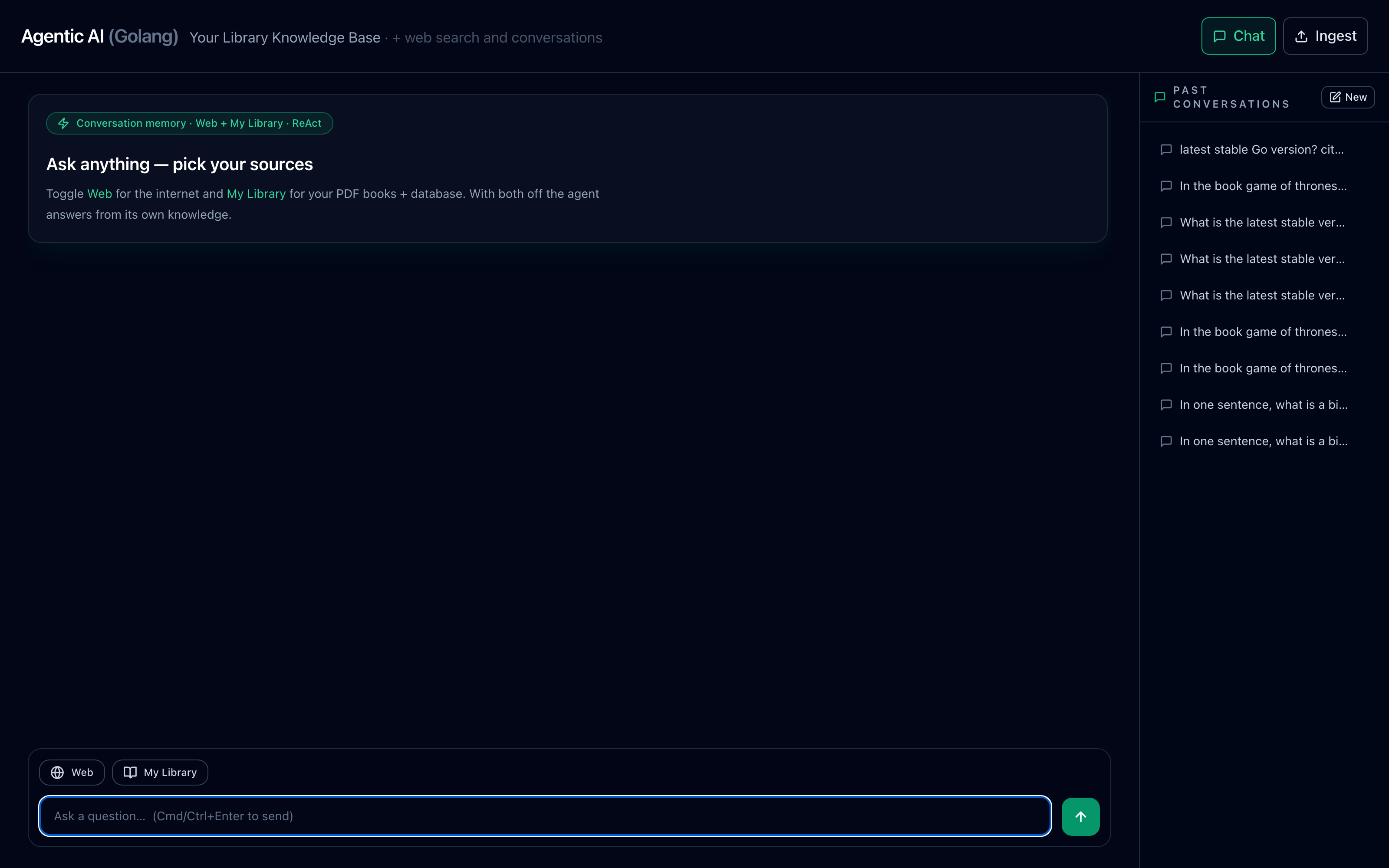
Empty chat hero with the Web and My Library source toggles and a message composer in a dark slate, emerald-accented UI.
Empty chat — the hero, the two source toggles, and the composer.
2

Toggle the sources on

Active toggles turn emerald. The active set decides which retrieval tools the ReAct loop is allowed to call this turn — search_pdf + mcp for Library, web_search for Web.
The Web and My Library source toggles in their active emerald-highlighted state.
Source toggles active — emerald means this source is in play.
3

Answer from My Library, narrowed to a book

Name a book and the agent resolves it against the catalog and filters the vector search to that title. The answer carries a from My Library provenance tag.
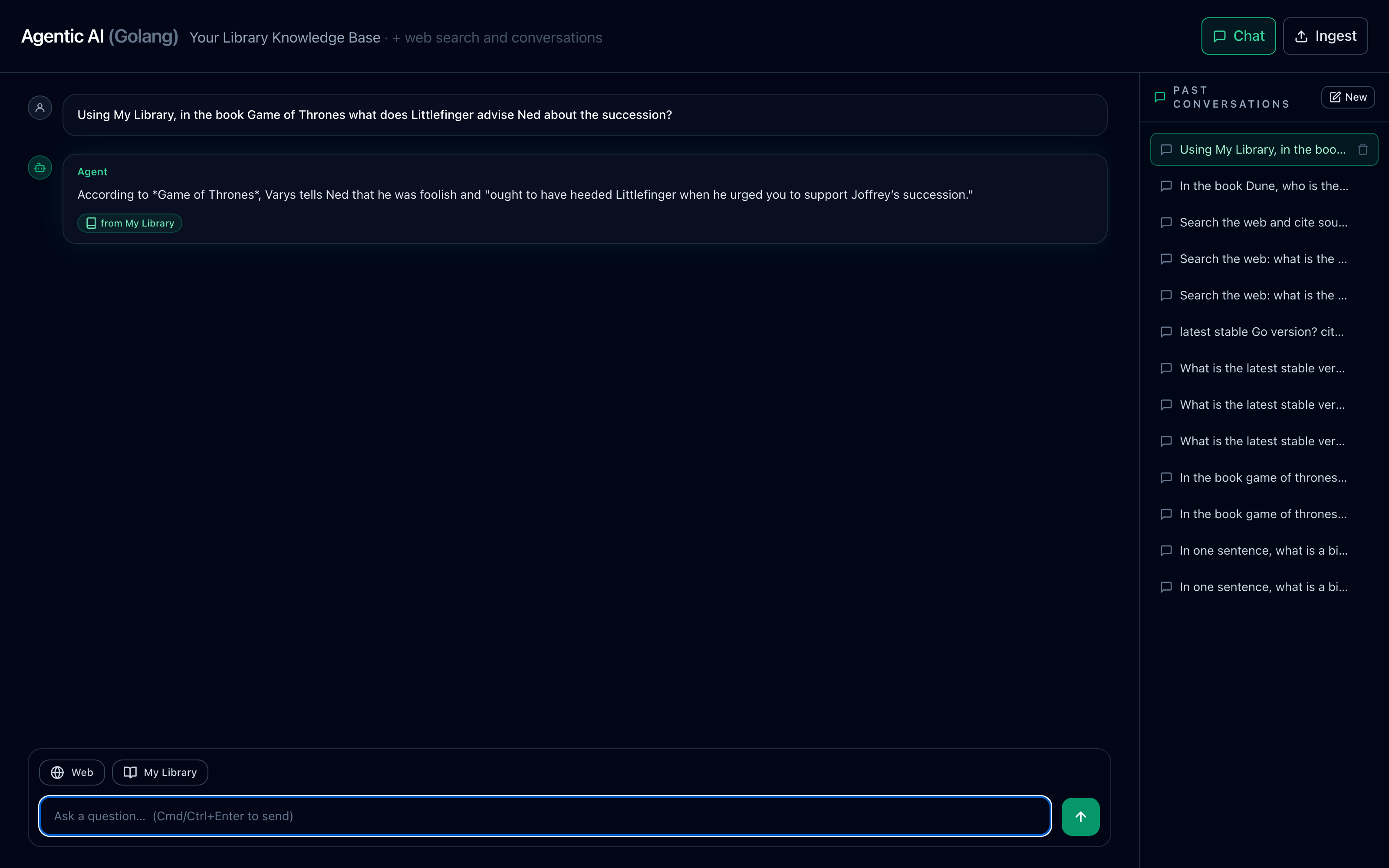
A chat answer grounded in a specific book from My Library, with a 'from My Library' provenance tag.
A library answer — book-title narrowing plus a "from My Library" tag.
4

Answer from the Web, with clickable sources

With 🌐 Web on, the agent searches Tavily and renders the source URLs as clickable "Sources" chips beneath a from Web tag.
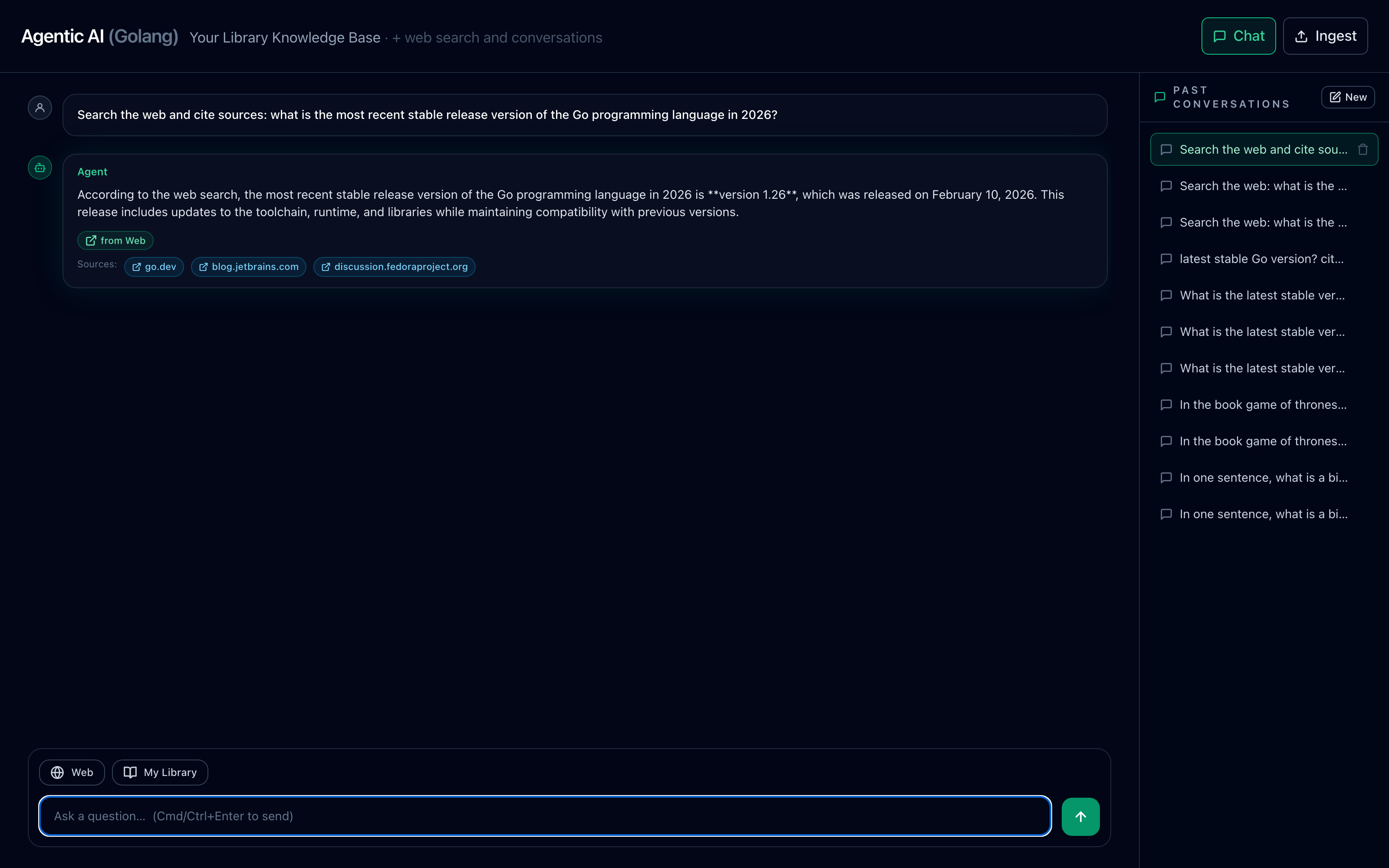
A chat answer grounded in live web search with clickable source URL chips and a 'from Web' tag.
A web answer — a "from Web" tag and clickable source chips.
5

Ask for clarification instead of guessing

When My Library is on but the topic can't be pinned to one book, the agent asks back — Needs your input — rather than hallucinating across thousands of chunks.
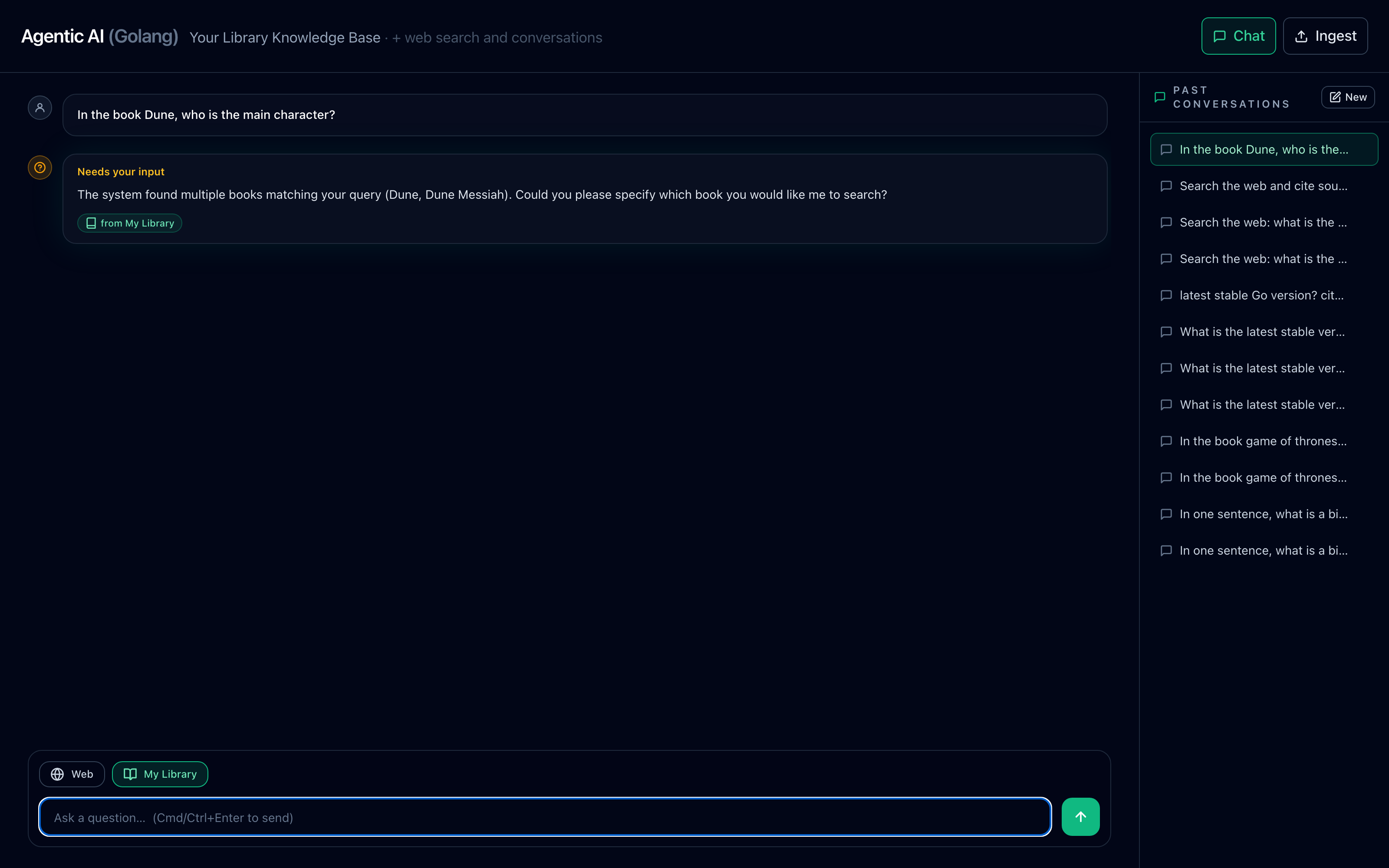
The agent asking a clarifying question instead of guessing when a query is ambiguous.
Sound judgment — clarify-back on ambiguous queries.
6

Add books with drag-and-drop ingestion

The /ingest.html page takes a PDF and runs extract → chunk → embed → upsert into Pinecone and the books catalog, adding it to My Library.
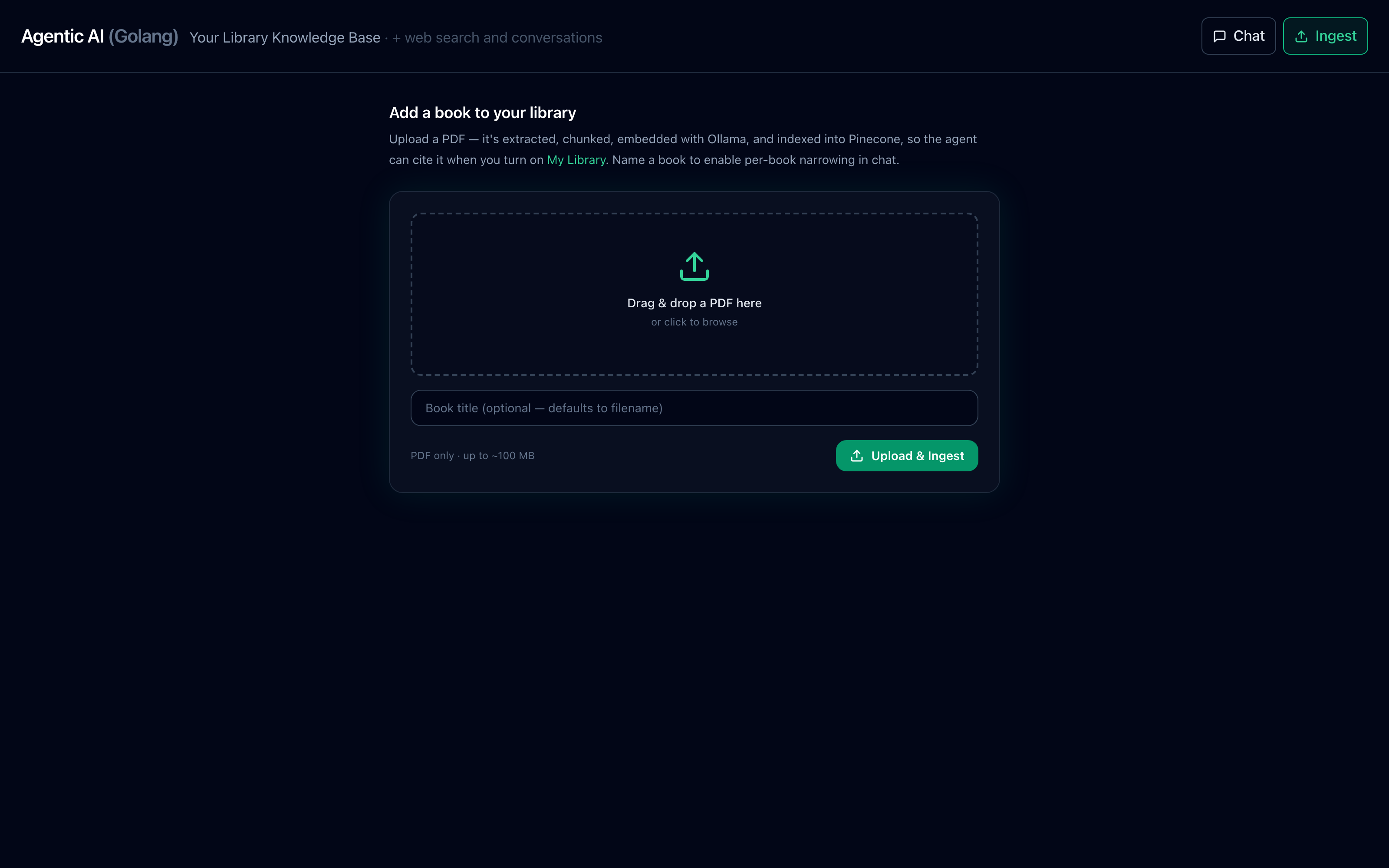
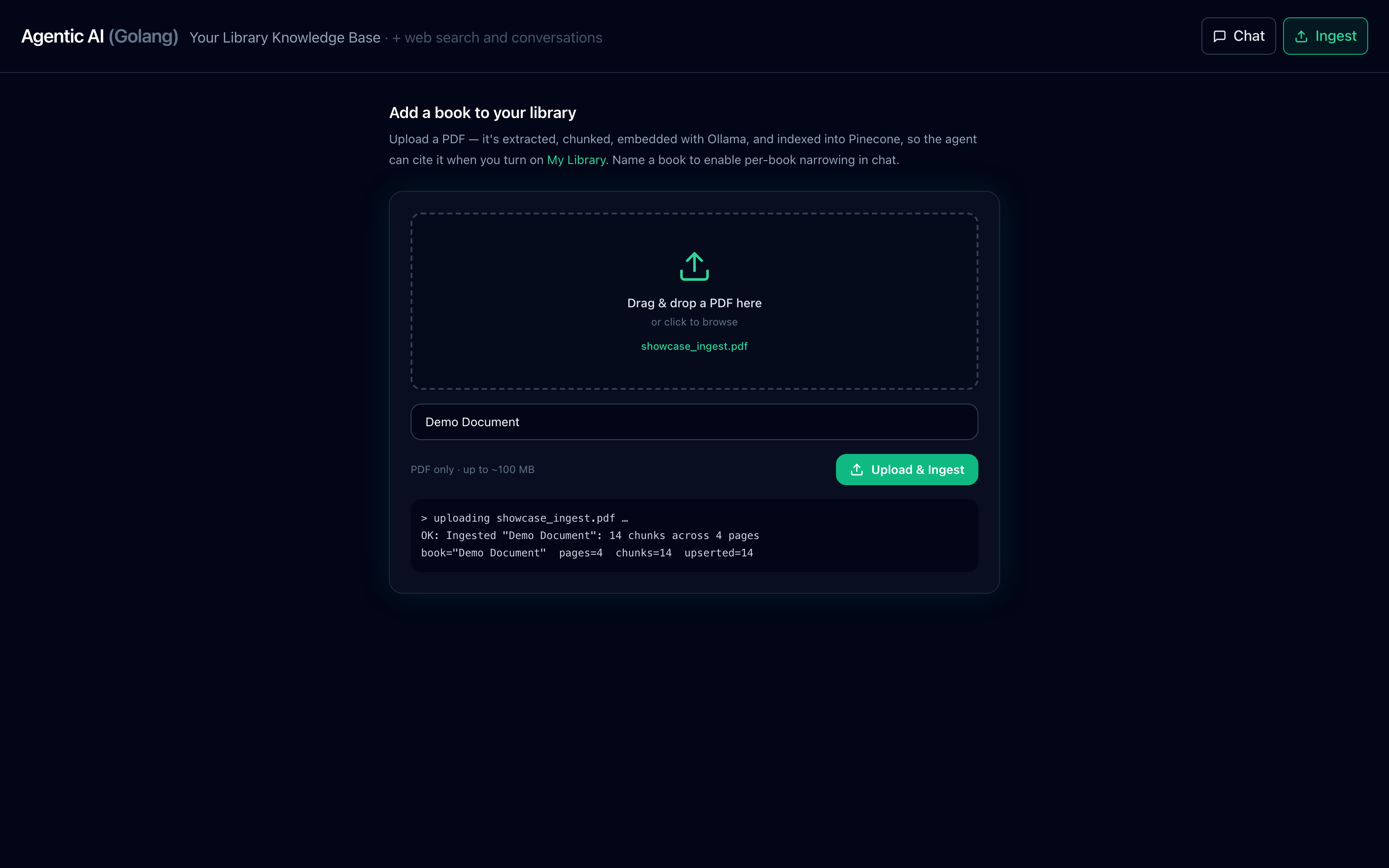
The drag-and-drop PDF ingestion page with a drop zone and a book-title field.
Ingest — drag a PDF, name the book, and index it into My Library.
Ingestion in progress: the status console reporting pages, chunks, and vectors upserted.
Real ingestion — the status console reports pages, chunks, and vectors upserted to Pinecone.
7

Reopen any past conversation

The right-hand sidebar lists prior conversations. Click one to reload its full thread — answers, source tags, and citations included.
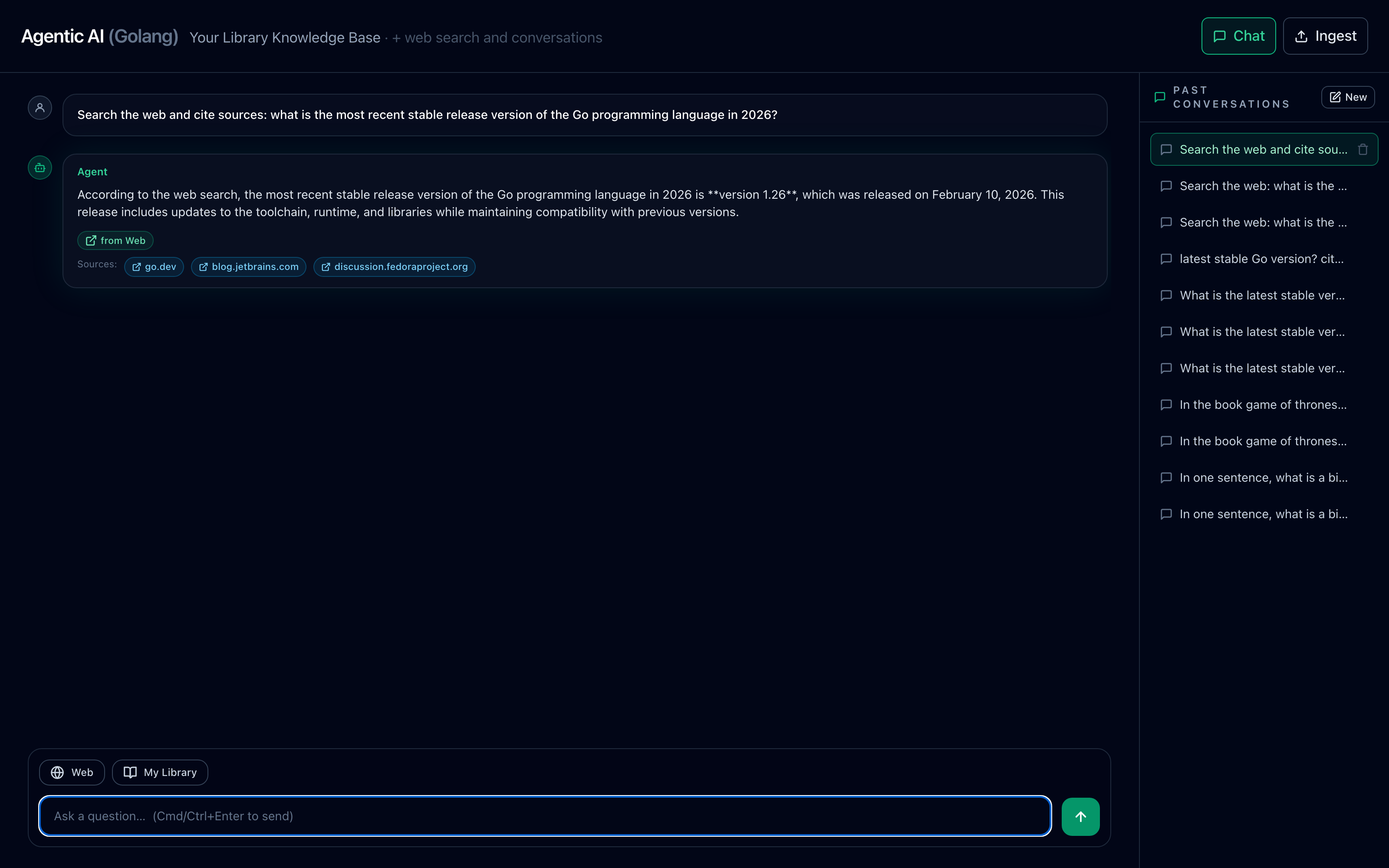
The past-conversations sidebar listing prior chats, ready to reopen.
Past conversations — click to reopen the full thread.
System design

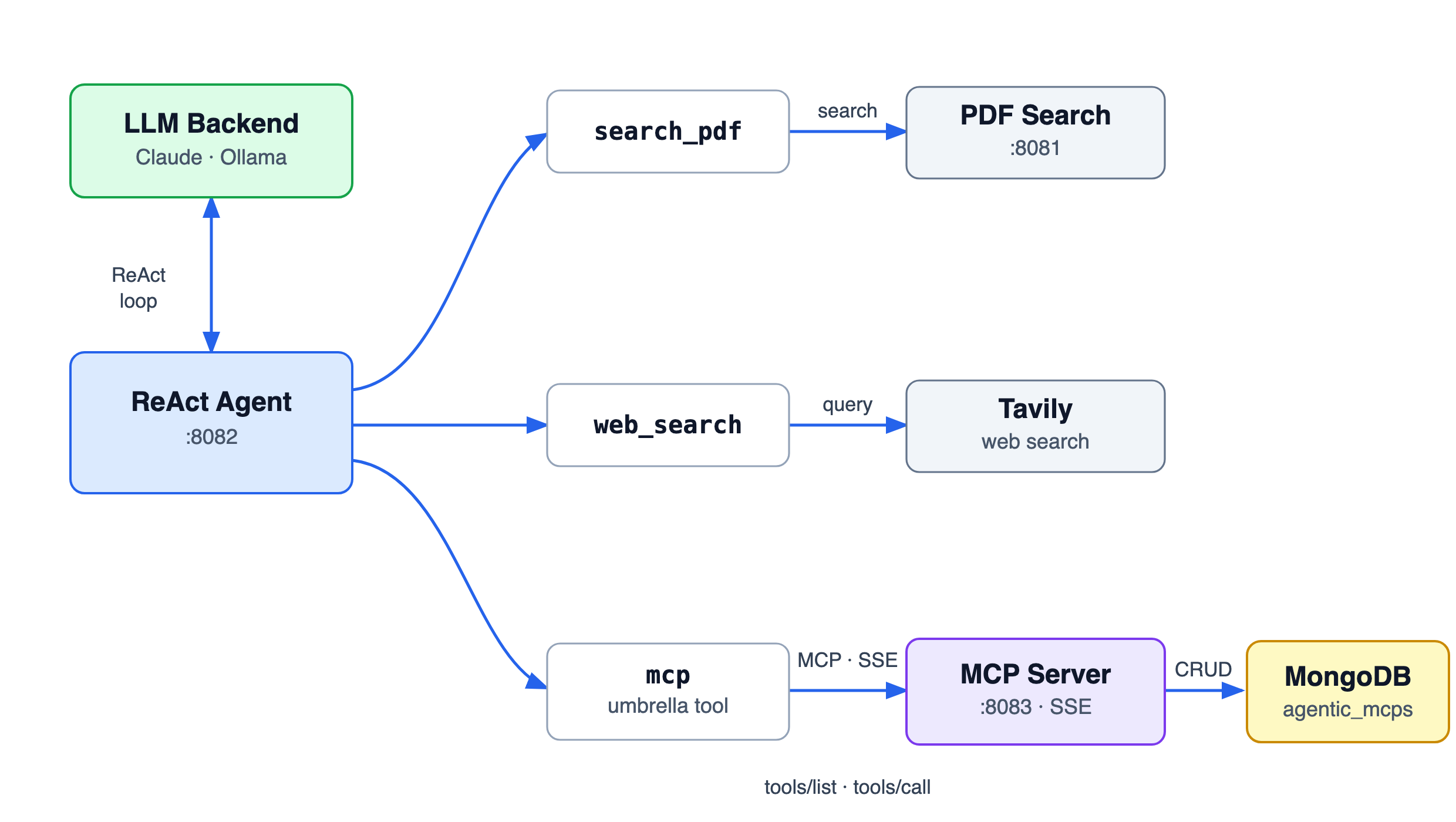
How it all fits together

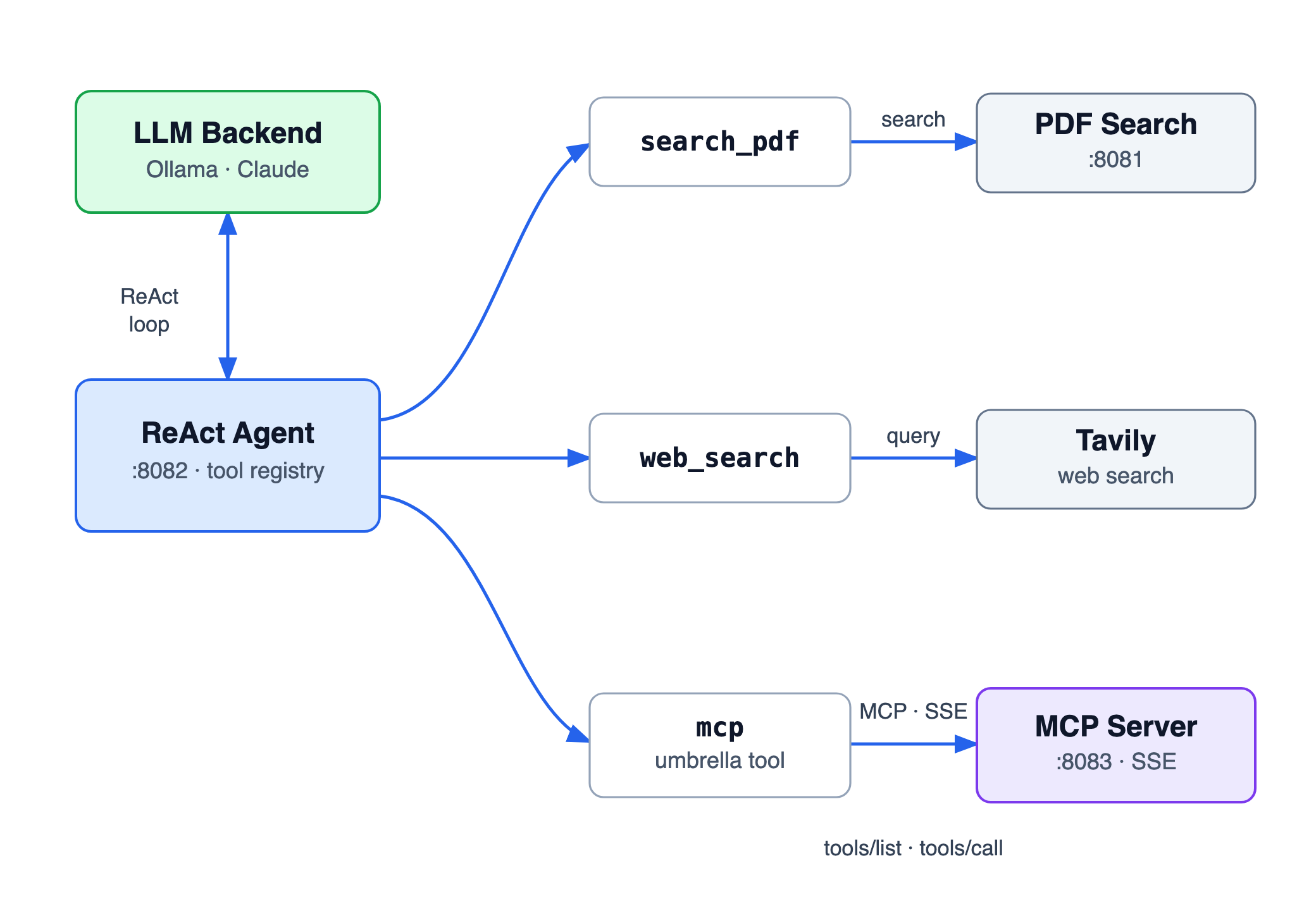
Two decoupled Go services and a pluggable LLM brain, joined by an open protocol. The agent reasons and picks its tools per turn; the MCP server exposes MongoDB as discoverable tools; nothing is hardcoded between them.

Agentic AI system architecture: a ReAct agent on port 8082 with search_pdf (native Pinecone), web_search (Tavily), and a single mcp umbrella tool connecting over SSE to the MongoDB MCP server on port 8083. A pluggable LLM backend (Claude or Ollama) drives the ReAct loop.
System data-flow — the ReAct agent, its three tool sources, and a standalone MongoDB MCP server over SSE.

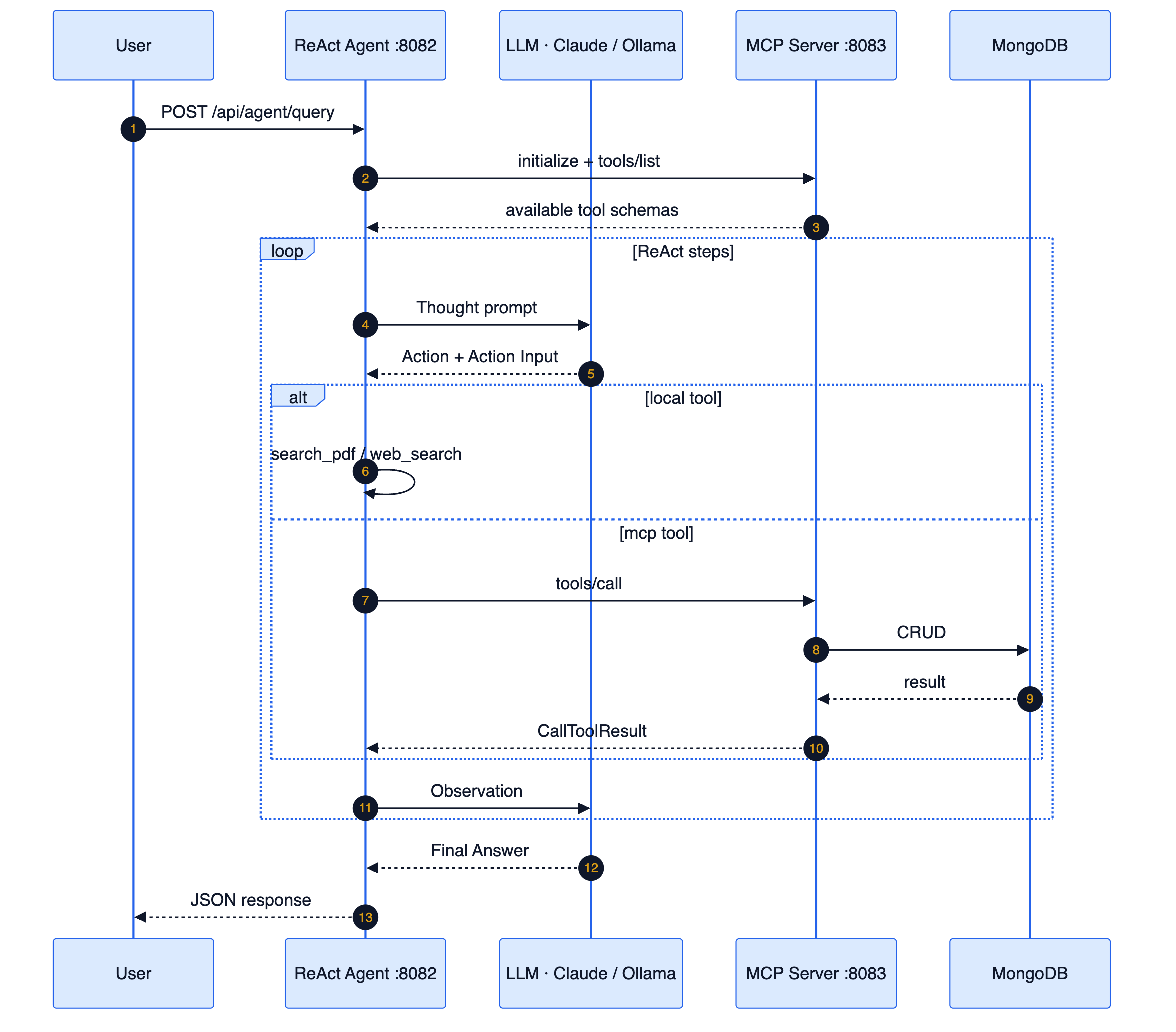
The ReAct loop, end to end

A single endpoint runs the full reason → act → observe cycle. The active tool set is assembled per request from the source toggles; tool observations live only inside one turn and are never persisted.

ReAct loop sequence diagram: the user posts a query to the agent, which lists tools from the MCP server, then loops through Thought, Action, tool execution (local search_pdf/web_search or MCP tools/call to MongoDB), and Observation, before returning a final JSON answer.
Request lifecycle — discovery via tools/list, then iterative Thought → Action → Observation until the final answer.

Token-budgeted memory

Recent turns are kept verbatim within a token budget; older turns fold into a rolling summary. Raw tool observations (Pinecone chunks, web text) are never persisted or replayed — re-retrieved fresh each turn if needed.

Per-turn tool gating

The active tool set is rebuilt every request: recall_history is always in; search_pdf + mcp only with My Library; web_search only with Web. The system prompt branches its guidance to match.

Service ports & endpoints

ServicePortEndpoint
ReAct agent + chat UI8082POST /api/agent/query · chat UI at / · ingest at /ingest.html
Ingestion8082POST /api/ingest (multipart PDF upload)
Conversations8082GET /api/conversations · GET|DELETE /api/conversations/{id}
MongoDB MCP server8083SSE at /sse
The agent's capabilities

Tools & data operations

Tools are wired in per turn based on the source toggles. The MongoDB operations are advertised by the MCP server at runtime and work against any collection.

Tool / OperationGated byWhat it does
recall_historyAlways onRead-only, conversation-scoped recall of earlier messages
search_pdf📚 My LibraryNative Pinecone vector search over your PDF books (Ollama embeddings), with book-title narrowing
web_search🌐 WebLive web search via Tavily, with source-URL citations
list_collections📚 · MCP · discoveredList all collections with document counts
query_documents📚 · MCP · discoveredQuery documents with an optional filter
insert_document📚 · MCP · discoveredInsert a new document
update_document📚 · MCP · discoveredUpdate matching documents
delete_document📚 · MCP · discoveredDelete matching documents
Two independent services

Modules

The system is two decoupled Go services wired together over MCP — the agent (the brain, tools, PDF search, ingestion, and conversation memory) and a standalone, general-purpose MongoDB MCP server.

🧠 agents/ ReAct agent + UI · :8082

The reasoning core and the chat + ingest UI. It assembles a per-turn tool set from the source toggles, runs the ReAct loop against Ollama or Claude, embeds queries and searches Pinecone natively, persists conversations to MongoDB, and ingests PDFs.

GoReActOllamaClaudePineconeTavilyMongoDB
Browse agents/ →

🗄️ mcp/ MCP server · :8083 / SSE

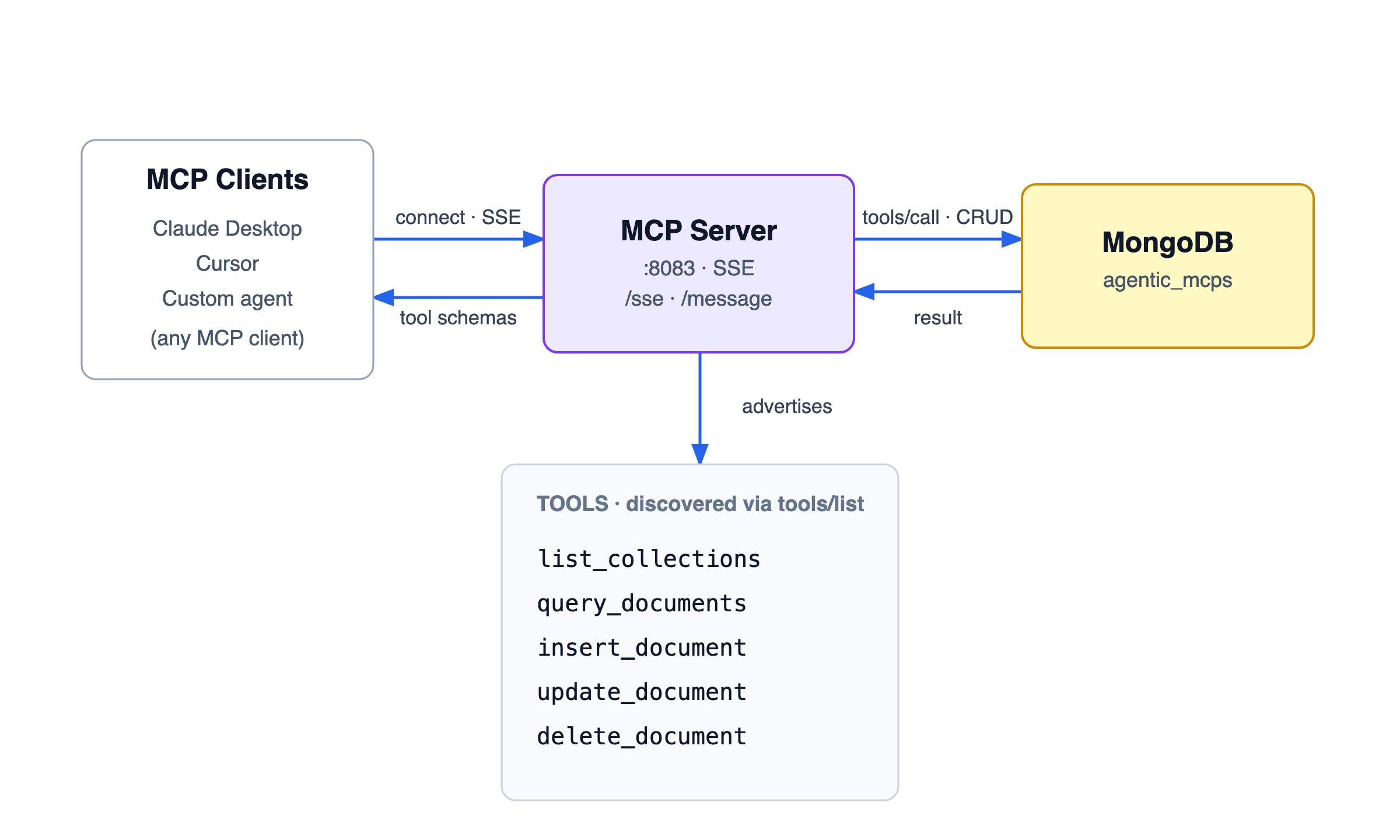
A standalone Model Context Protocol server exposing a MongoDB database as MCP tools over HTTP/SSE. General-purpose — the CRUD tools operate on any collection and any document shape. Connect any MCP client; it is agent-agnostic.

GoMCPMongoDBSSEClaude DesktopCursor
Browse mcp/ →
agents module data-flow diagram
agents/ — ReAct agent + per-turn tools → search_pdf · web_search · mcp · recall_history
mcp module data-flow diagram
mcp/ — clients over SSE → MCP server → MongoDB; tools discovered via tools/list
Get running

One-command setup

A single script installs and verifies Go, MongoDB, and Ollama, pulls the models, builds both modules, and creates your config files. The only thing you provide is API keys (Tavily / Pinecone / optionally Anthropic).

# macOS · Homebrew · idempotent — safe to re-run
git clone https://github.com/dharmendrra/agentic-ai.git
cd agentic-ai
./setup.sh

# Then start the two services in separate terminals:
cd mcp    && go run .      # MongoDB MCP server on :8083
cd agents && go run .      # Agent + chat UI on :8082

# Open the UI
open http://localhost:8082            # chat
open http://localhost:8082/ingest.html # add PDFs to My Library

What setup.sh automates

Installs/verifies Go, MongoDB (and starts the service), and Ollama; pulls nomic-embed-text + a chat model; runs go mod download and builds both modules; copies config.example.json → config.json in agents/ and mcp/ if missing.

What you provide

API keys can't be auto-provisioned. The script reads TAVILY_API_KEY, PINECONE_API_KEY, PINECONE_HOST (and optionally Anthropic) from your environment if set — otherwise it writes placeholders and prints exactly which keys to fill in agents/config.json. config.json stays gitignored.

Engineering surface area

Technology stack

A Go-centric, local-first stack built around an open protocol — portable across LLM backends and MCP clients.

● Go 1.21+ ● Model Context Protocol ● MongoDB ● Pinecone (vector search) ● Ollama (local LLM + embeddings) ● Anthropic Claude (optional) ● Tavily web search ● ReAct prompting ● Server-Sent Events ● Tailwind CSS + Lucide

Dig into the engineering

Full Go source, per-module READMEs, MCP client setup for Claude Desktop & Cursor, API + storage-format docs, and architecture diagrams live in the repository.